

Though I've always felt antagonistic towards the army of content creators that flood every screen's feed on every single platform, here I am creating content. It's embarrassing to even think about someone eventually reading these posts, but this will probably be a good exercise in composition and pre-writing research. Some days ago, I found a really nice blog from a fellow SWE that reminded me of an ideal version of the internet where I am not constantly being sold a product. Of a place where common interests would gather people to share their small portion of the world.
I've longed for that feeling of sincere, uncompromising online interaction for as long as I remember, and it's the reason why I have Reddit as my main social network, even though it experiences the same decay as other sites regarding hyper-monetization and bot swarming. On the other hand, the radicalization and rot of 4chan, otherwise a site with the very same concept I strive for, makes it completely unusable for any serious talk.
That's why, despite my own aversion to the act of exposing myself in a creative fashion, I decided to start this blog with the single pretense of sharing what I know. And hopefully, learning something back if someone happens to stumble upon any of my posts.
So, how did I set this up? I think a description will make a nice first entry.
This year, I got fed up with Netflix and HBO Max telling me what I am supposed to watch and the quality I am supposed to stream it at. That frustration prompted me to start my own homelab to serve my already-existing collection of 500 DVD-ripped movies. No special hardware is required; any toaster no older than from 2005 should be able to decently boot an Ubuntu Server image and serve stuff through HTTP. Enter the toaster:
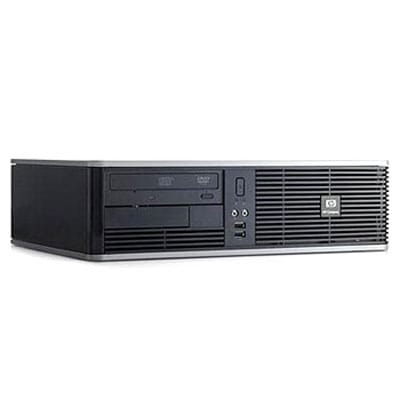
Terrible stock image of the HP Compaq dc5800 small form factor (credits to PC Magazine UK), but it will do. The thing has an Intel Core 2 Quad, 4 GB of DDR2 RAM, and a GTX 1050 Ti it can't even use because the last NVIDIA driver to support it doesn't compile anymore against Linux kernel 7.0.0. Nice rig, right? It makes the setup more fun.
Once I had Ubuntu Server up and running in the beast, I proceeded to install the Docker Engine through APT by following these official instructions. For anyone still not using Docker to deploy services, I wholeheartedly recommend them to just install it and pull something from Dockerhub. There's an image for absolutely any app you could think of and it abstracts your host machine from any sort of arch or dependency conflict.
The first step I do immediately after installing Docker on any host is to spin up a Portainer Community Edition instance. It's great because it allows you to create and manage Docker stacks (basically a declared set of containers and their runtime parameters/environment variables) through the Docker Compose tool. More importantly, it allows to you to do this through a web interface so you can manage your deployments remotely. Though I'm sure it's not the most popular choice in recent times due to their announcement to cease feature parity with the paid tier of the app, its current state remains an Open Source project and I honestly don't think I'm missing anything that warrants migrating all my systems to a different Docker manager.
Thanks to this setup, I easily raised a Ghost container by using the following compose:
services:
  remark42:
      image: ghcr.io/umputun/remark42:latest
      container_name: remark42
      restart: always
      ports:
        - "127.0.0.1:8089:8080"
      environment:
        - REMARK_URL=${REMARK_URL}
        - SECRET=${SECRET}
        - SITE=${SITE}
        - AUTH_ANON=${AUTH_ANON}
        - DEBUG=${DEBUG}
      volumes:
        - remark42_data:/srv/var

  ghost:
    image: ghost:5-alpine
    container_name: ghost_blog
    restart: always
    ports:
      - "127.0.0.1:2368:2368"
    depends_on:
      - db
    volumes:
      - ghost_content:/var/lib/ghost/content
    environment:
      url: ${BASE_URL}
      database__client: mysql
      database__connection__host: db
      database__connection__user: ghost
      database__connection__password: ${DB_PASSWORD}
      database__connection__database: ghost_prod
      NODE_ENV: production
      # --- Email Configuration ---
      mail__transport: SMTP
      mail__options__service: ${MAIL_SERVICE}
      mail__options__host: ${MAIL_HOST}
      mail__options__port: ${MAIL_PORT}
      mail__options__auth__user: ${MAIL_USER}
      mail__options__auth__pass: ${MAIL_PASSWORD}
      mail__options__from: ${MAIL_FROM}

  db:
    image: mariadb:10.6
    container_name: ghost_db
    restart: always
    volumes:
      - mysql_data:/var/lib/mysql
    environment:
      MYSQL_ROOT_PASSWORD: ${DB_ROOT_PASSWORD}
      MYSQL_DATABASE: ghost_prod
      MYSQL_USER: ghost
      MYSQL_PASSWORD: ${DB_PASSWORD}

volumes:
  ghost_content:
  mysql_data:
  remark42_data:
Ghost is the blog manager I'm writing into at this very moment to write this entry. It's based on Node.js and promises to be as versatile as WordPress without devolving into plugin hell, so I guess we'll see how this blog goes. The other composed services are the MariaDB instance that handles data persistence for everything on the site, and also a self-hosted comment manager called Remark42, which allows you guys to write comments at the bottom of the posts. The Remark42 integration is a little bit more involved and requires editing the active Ghost theme's code so that the comments box is inserted at the bottom of all posts.
I'm actually still not sure about who I'm writing this for, homelab newbies or more intermediate IT enthusiasts, so I think I'll skip the "why the thing you just deployed on http://localhost only works on your local host" and go straight to what I'm using for public-facing connectivity. My ISP is the dumb kind of corp like Netflix and HBO that thinks I'm too dumb to operate my own devices, so they use TR-69 router management to periodically rotate admin credentials and keep me locked out of its config page. As such, port-forwarding to an Nginx instance is not an option.
Thankfully, Cloudflare (where I bought this domain) is on the decent corps side and allows you to create host-initiated tunnels (no port-forwarding needed!) that route your domain, or any subdomain, to a TCP port reachable on the host's LAN by registering your tunnel through the 'cloudflared' daemon, effectively making cloudflared a reverse proxy. That way, this domain is being proxied by Cloudflare, where traffic gets redirected to the tunnel that ends on my private host, and no additional security consideration is needed since the host is not publicly reachable! I do this for all my self-hosted services like Jellyfin and NextCloud.
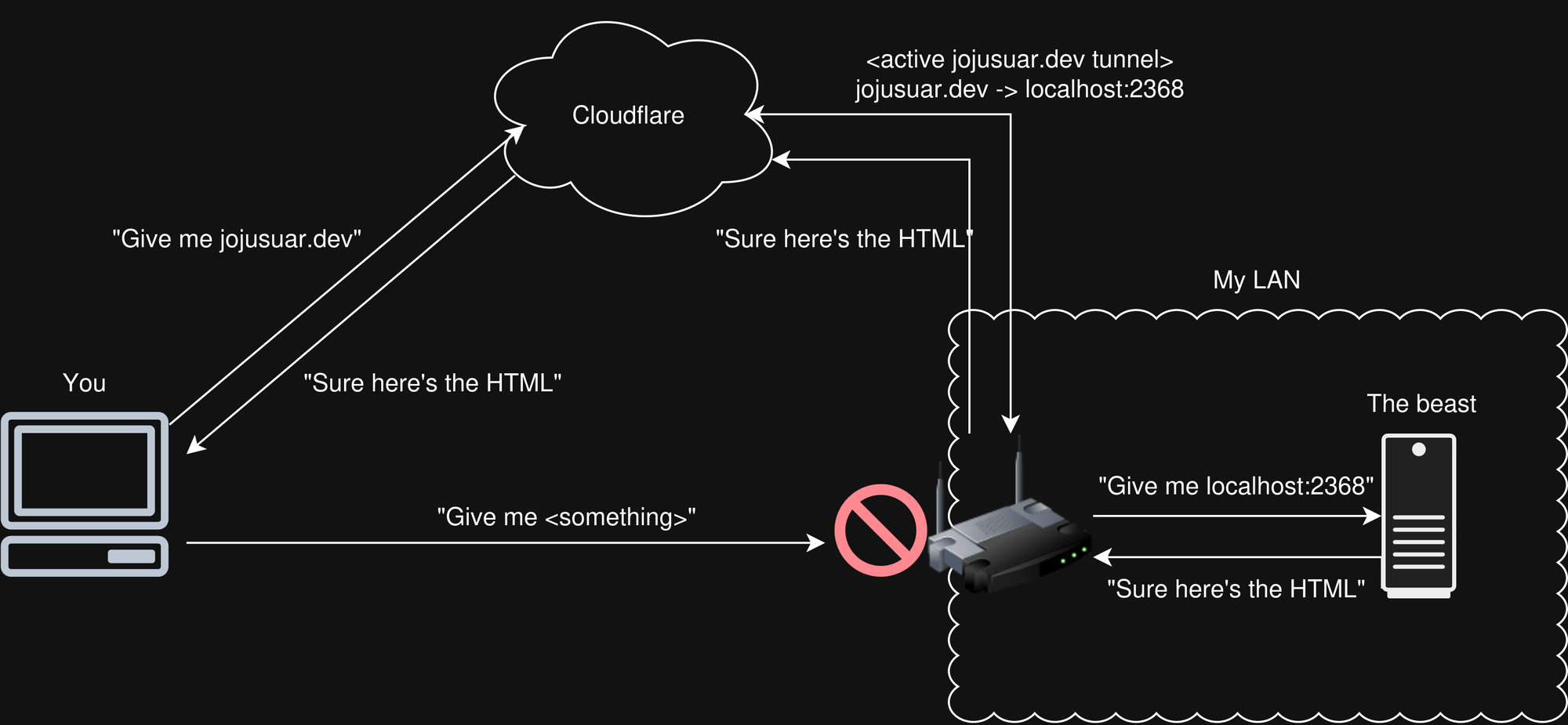
So, I routed both https://jojusuar.dev and https://comments.jojusuar.dev to the ports in my host where the Ghost and Remark42 services are currently bound, respectively. That makes them publicly accessible from the internet!
With the domain active and pointing to the services, I configured the Remark42 integration by pasting the following snippet into my Ghost theme's post.hbs file:
<div id="remark42"></div>
  <script>
      var remark_config = {
          host: 'https://comments.jojusuar.dev',
          site_id: 'jojusuar-blog',
          components: ['embed']
      };

      // Loader script
      !(function (e, n) {
          for (var o = 0; o < e.length; o++) {
              var res = n.createElement('script');
              res.src = remark_config.host + '/web/' + e[o] + '.js';
              res.defer = true;
              (n.head || n.body).appendChild(res);
          }
      })(['embed'], document);
  </script>
The theme I'm currently using is called Attegi. Once downloaded, the code section to replace in the post.hbs file is usually marked by a conditional statement that checks for the comments option in Ghost's admin settings, and must be completely replaced by the snippet above.
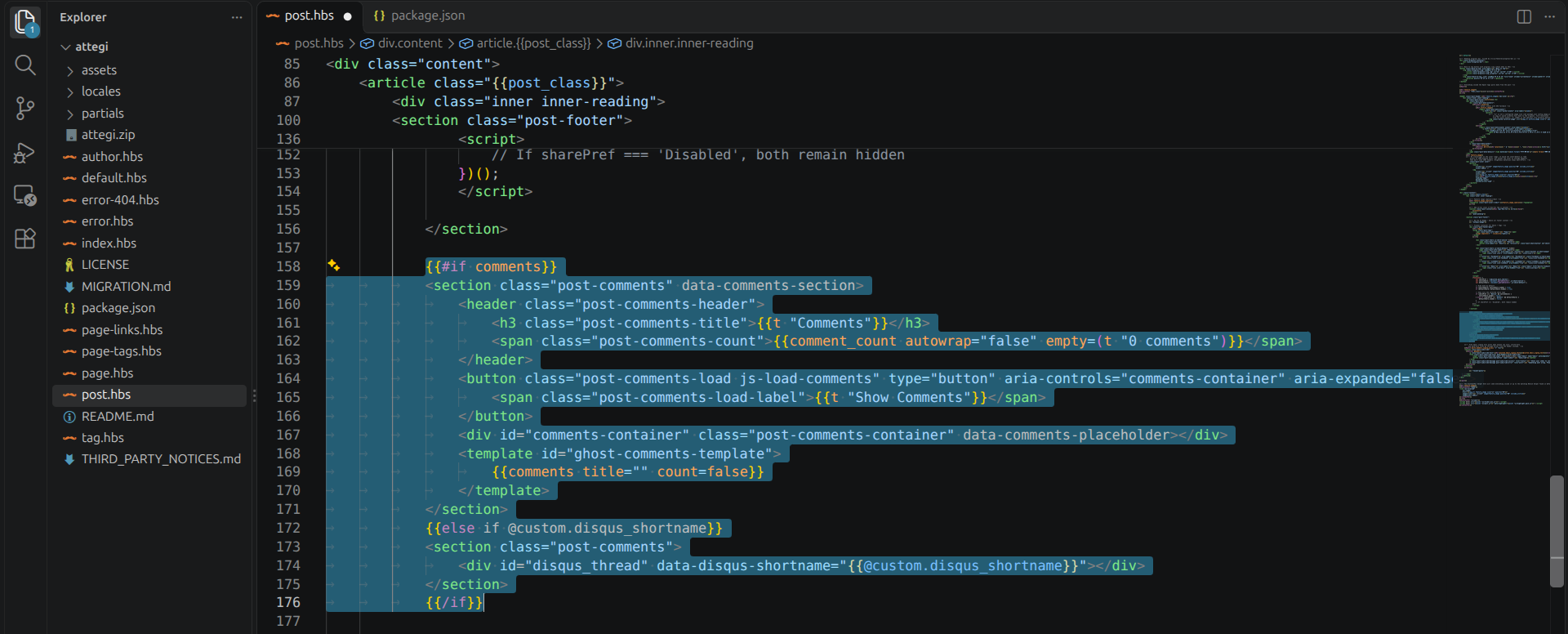
In the case of this specific theme, I also had to delete the package.json section declaring the use of a Disqus shortname, since we just deleted the code section that depended on it. Not doing this will prevent the theme from being loaded into Ghost:
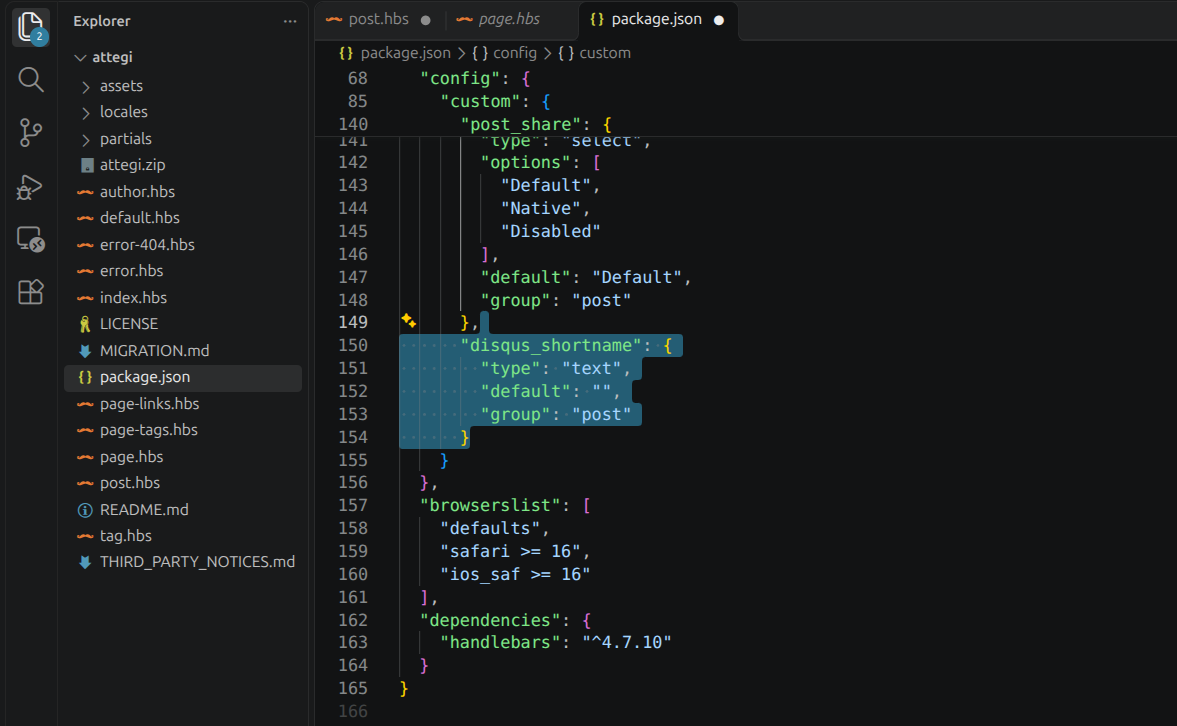
Then, zipping the theme's project and uploading it to Settings > Theme on Ghost will automatically load the Remark42 comments box on any post.
In broad strokes and more or less technical detail, that's how this place is set up. If anything was unclear or could have used a deeper explanation, I'd love to read any suggestion, feedback or correction, maybe the idea for the next post will rise from it.